![[Guide] Gear switch macro for 4.6 banner](/riftshade-bg.png)
Why do I need this?
Switching quickly between multiple sets of gear helps to be prepared for either a PVP, PVE situation, or for a specific opponent. There are multiple variations of these macro's documented online, but many of them do not work with our Aion version.
The challenge: Right side and offhand items
Simply asking a macro to equip an item will not place it into the offhand or right side earring/ring slot if that slot is already filled with an item. Later patches of Aion provide macro functions such as /equipslot and /UseRight , but these are unavailable in version 4.6.
Solution: Create an empty slot first
Let's make use of the following features.
- When you /Use or /Quickbar an already equipped item it becomes unequipped, emptying the offhand of right-side slot.
- When you have an item equipped in the left side or mainhand slot and the right side slot is empty, equipping an item with /Use or /Quickbar equips it to the right side.
Our macro will first use the currently equipped right side item to unequip it, before selecting a new item to fill that slot. It uses the /Quickbar command. It is also possible to reference an item by name using a different command.
Caveat: This does not work when your right side and left side items are identical. If you have a working solution to this, please share it in a comment.
Setup
- Switch to an unused quickbar set. In my case that is quickbar set 2.
- Create one row of PVP items, and one row of PVE items. Match the item slots in the same column.
- Create a macro, and drag/drop the quickbar slots from left to right into the macro. Before dragging an offhand or right-side item into the macro, first drag the item that would be currently equipped in that slot into the macro.
- Use the macro from an action bar.
In this example, the Quickbar commands starting with 2 unequip the offhand sword and right side earring, before equipping the new item.
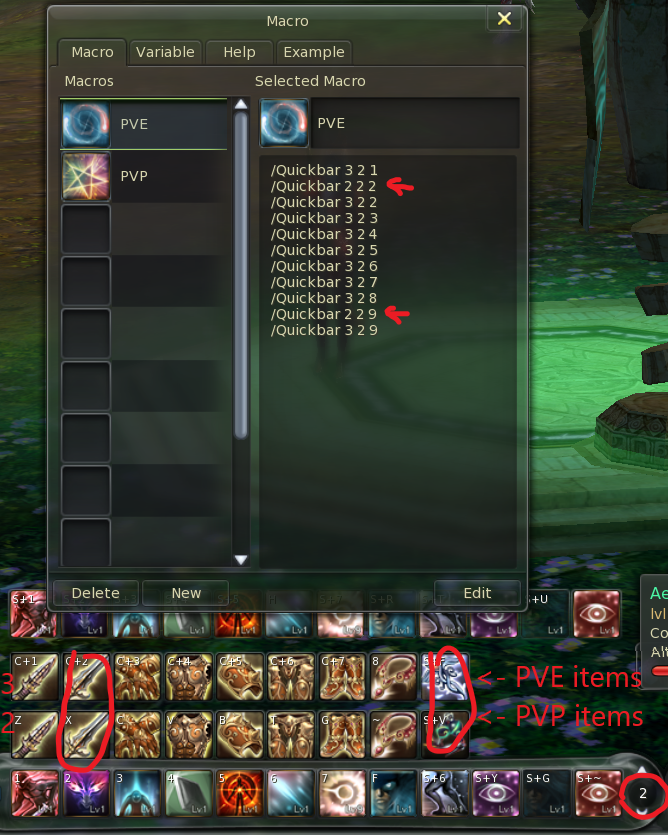
This results in the macro
/Quickbar 3 2 1
/Quickbar 2 2 2
/Quickbar 3 2 2
/Quickbar 3 2 3
/Quickbar 3 2 4
/Quickbar 3 2 5
/Quickbar 3 2 6
/Quickbar 3 2 7
/Quickbar 3 2 8
/Quickbar 2 2 9
/Quickbar 3 2 9
Enjoy,
Glimpse